Meilisearch Operation
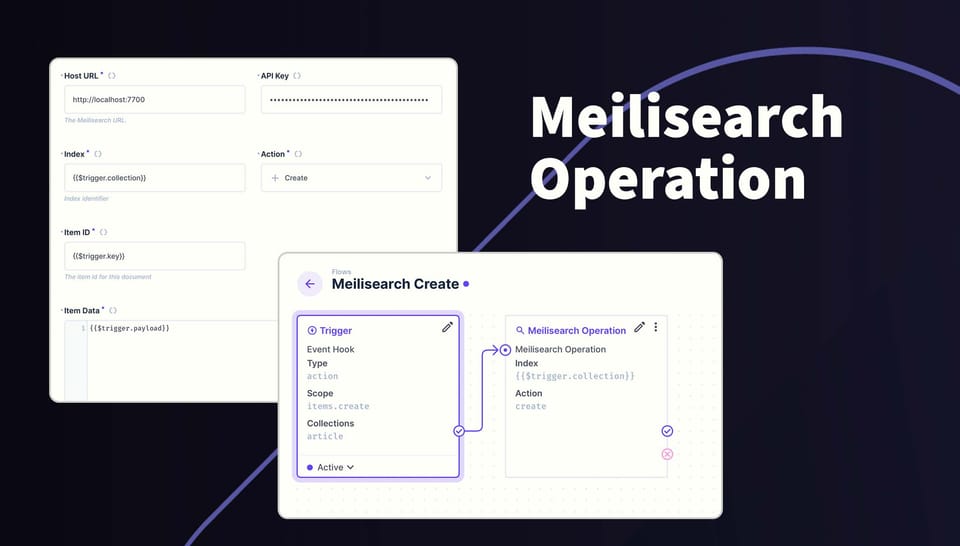
Intergrate Directus content with a Meilishearch cloud project or selfhosted project using Flows. This extension adds a new operation to your flows called Meilisearch and uses an API key with full write access to create, update and delete documents in your search indexes. Meilisearch operation is available via the Marketplace.
The operation is processed on the server side. If using localhost, Meilisearch must be on the same server.
 Bryant Gillespie
Usage
In a Flow, select the Meilisearch as an operation, then populate the required fields. Here is detailed information on each field.
| Field | Type | Comments |
|---|---|---|
| Host | URL | For cloud projects, the URL will look something like this: https://my-Meilisearch-project-a0123bc.es.reigon-1.aws.elastic.cloud. A local project will have a URL like this: http://127.0.0.1:7700 |
| API Key | string | The master key |
| Index | string | The identifier for the index. This is usually the collection such as the {{$trigger.collection}}variable. |
| Action | Create, Read, Update or Delete | Choose the desired action for this request. |
| Item ID/Key | string, integer or an Array | The identifier for the item. Typically {{$trigger.key}} or {{$trigger.keys}}. |
| Item Data | json | The content for this request. This can be {{$trigger.key}} or the output from another operation. |
| Query | json | A Meilisearch query object. API Reference |
Here are some examples on how you can use Directus to maintain a Meilisearch index.
On Create
- Create a flow that is triggered on item.create and choose all the collection to include.
- Add the Meilisearch operation and set:
- index to
{{$trigger.collection}} - action to Create
- item id/key to
{{$trigger.key}} - item data to
{{$trigger.payload}}.
- index to
On Update
- Create a flow that is triggered on item.update and choose all the collection to include.
- Add the Meilisearch operation and set:
- index to
{{$trigger.collection}} - action to Update
- item id/key to
{{$trigger.keys}} - item data to
{{$trigger.payload}}.
- index to
On Delete
- Create a flow that is triggered on item.delete and choose all the collection to include.
- Add the Meilisearch operation and set:
- index to
{{$trigger.collection}} - action to Delete
- item id/key to
{{$trigger.keys}}
- index to
Manual Trigger
This is useful if you want to manually index items using a manual flow.
- Create a second flow that is triggered by another flow and set the Response body to the Data of the last operation.
- Add the Meilisearch operation and set:
- index to
{{$trigger.collection}} - action to Update
- item id/key to
{{$trigger.key}} - item data to
{{$trigger.payload}}.
- index to
- Create a manual flow set the following:
- choose the collections to include
- location to Collection only
- leave 'Required Selection' checked
- Add the Read Data operation with the following:
- collection set to
{{$trigger.body.collection}} - IDs set to
{{$trigger.body.keys}}
- collection set to
- Create a Script operation to transform that data into valid payloads. Copy and paste the following:
module.exports = async function(data) {
	return Array.isArray(data['$last']) ? data['$last'].map((item) => {
    	return {
            collection: data['$trigger'].body.collection,
            key: item.id,
            payload: item,
        };
    }) : [
      {
        collection: data['$trigger'].body.collection,
        key: data['$last'].id,
        payload: data['$last'],
      }
    ];
}
- Create an operation that triggers another flow.
- From the dropdown, cloose the flow created in step 1
- Set the Iteration mode to serial
- Set the Payload to
{{$last}}
Now you can open any of the included collections and tick all the items to index, then click the flows icon (lightning bolt) from the right navigation bar and click the button. The label will match what you called the flow.
Check it out on NPM
https://www.npmjs.com/package/@directus-labs/meilisearch-operation